

Video: Watch the employee self-service agent demo
An employee self-service agent is most useful when it can answer from the systems employees already rely on, while keeping those systems’ access rules and approval steps in place. This demo shows an agent in M365 Copilot connected to SharePoint HR documents, ServiceNow, Workday, and SAP SuccessFactors.
Answers with a path back to the source
The demo starts with questions about HR processes and policies. The agent searches SharePoint, returns an answer, and includes a citation that opens the source document. That gives an employee a quick response without hiding where the information came from.
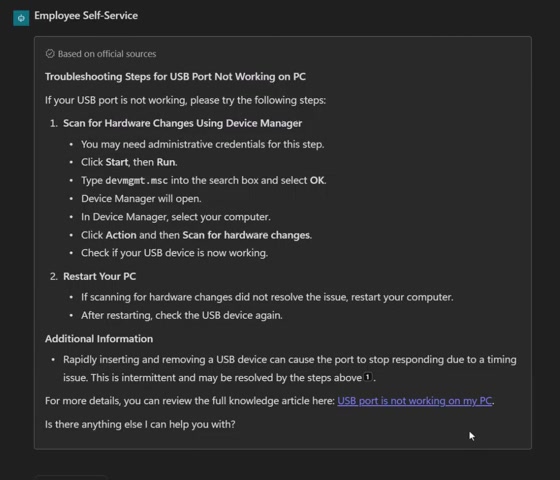
The ServiceNow Knowledge example uses the same approach. The agent answers a USB troubleshooting question with steps from a knowledge article and links to that article. The employee can check the source or mark whether it helped.
ServiceNow tickets in the conversation
The agent can retrieve tickets available to the signed-in employee, show details for a selected incident, and link to the corresponding ServiceNow record. The video also demonstrates creating and updating tickets from the chat experience.
For a new ticket, the agent prepares a form with information from the conversation. The employee can review and edit it before submission. For an existing ticket, the agent presents options to resolve it or add a comment or work note. Those actions make the write boundary visible instead of silently changing a record in the background.
The access scope matters as much as the convenience. In the demo, ticket results are limited to records the employee can access. A real deployment should preserve the connected system’s permissions and make any write action clear to the person submitting it.
Workday profile and leave questions
The Workday portion covers employee profile information and leave balances. The agent can retrieve information from the employee’s profile, and it can present a form for an address change. Submitting that change sends it through Workday’s HR approval process rather than treating a chat response as an approved update.
The agent also answers a policy question using an HR document in SharePoint. Workday supplies employee-specific profile data; SharePoint supplies policy guidance.
Training from SAP SuccessFactors
The final section uses SAP SuccessFactors to show assigned and mandatory training. The employee can ask for course suggestions related to a future role and ask the agent to add selected courses to a learning plan.
The employee can stay in one conversation while the agent queries each system. Each answer still needs a clear source: SharePoint for HR documents, ServiceNow for support tickets and knowledge, Workday for employee-profile information, and SAP SuccessFactors for learning records.
Design checks before rollout
A connected experience needs clear boundaries. Confirm that each connector honors the user’s access in its source system. Distinguish answers drawn from policy documents from answers drawn from personal records. For changes to employee or ticket data, show what will be submitted and where approval is required. Keep citations and links visible so employees can verify the answer in its original system.
In this demo, citations point back to SharePoint and ServiceNow, ticket changes are presented for review, and the Workday profile change follows an HR approval path. Those are the details to validate when moving this kind of experience into a real employee workflow.
Screenshot: The agent returns troubleshooting steps from a ServiceNow knowledge article and links to its source.
This is a demo walkthrough. Connector availability, access behavior, and approval flows should be validated in the target environment.